

Download Mini Mouse Macro – Free, Secure & Portable Macro Recorder for Windows, Mac, Android & iOS
Mini Mouse Macro is a powerful, free, and portable tool designed to record and replay mouse and keyboard actions in real-time. Unlike traditional macro recorders that require manual input of coordinates and actions, Mini Mouse Macro captures every movement, click, and keystroke as you perform them. This makes it ideal for automating repetitive tasks across Windows, Mac, Android, and iOS environments.
Whether you're a beginner looking to simplify daily workflows or an advanced user aiming to streamline complex processes, this software delivers precision, speed, and ease of use. With a lightweight footprint and minimal system impact, Mini Mouse Macro runs efficiently on older machines and doesn’t require installation—just download, run, and start recording. Its intuitive interface and real-time playback animation help users visualize every step of their recorded macro.
Perfect for content creators, gamers, data entry professionals, and IT administrators, Mini Mouse Macro is a top-tier alternative to tools like Macro Recorder, Easy Macro Recorder, and Mouse Recorder.
Key Features of Mini Mouse Macro
Mini Mouse Macro stands out in the automation software landscape due to its unique combination of real-time recording, portability, and user-friendly design. One of its most powerful features is the ability to record mouse movements, clicks, and keyboard inputs exactly as they happen—no need to manually define X and Y coordinates or action sequences. This real-time capture ensures 100% accuracy, especially for complex workflows involving multiple windows or precise timing.
Another standout feature is its portability. The software is completely standalone—no installation required. You can run it directly from a USB flash drive, making it perfect for use on shared or restricted computers. This is particularly useful for professionals who work across multiple devices or need to maintain privacy and security by avoiding permanent software installations.
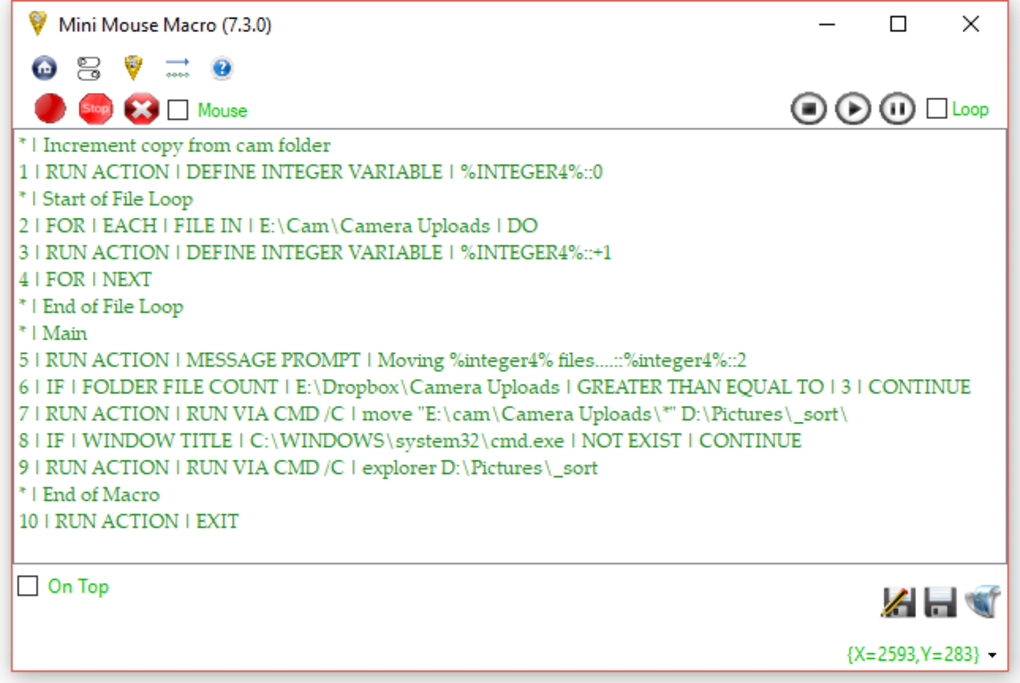
The interface is clean and intuitive, featuring a main window that displays a live log of all recorded actions, including timestamps, mouse coordinates, and action types. Playback is smooth and customizable—users can adjust speed, enable loop mode, and even pause or stop playback at any time. The playback animation shows the cursor movement in real-time, helping users verify accuracy before execution.
Mini Mouse Macro also allows manual entry of custom actions, giving advanced users full control over macro creation. You can insert delays, add conditional logic (via scripting), and fine-tune timing for perfect synchronization. Additionally, the app runs quietly in the system tray when idle, ensuring it doesn’t interfere with other tasks.
How to Install and Use Mini Mouse Macro
Installing and using Mini Mouse Macro is refreshingly simple—no traditional setup process is needed. To get started, visit the official website and download the latest version of the software. The file is typically a lightweight .exe (for Windows), .dmg (for Mac), or a portable package compatible with Android and iOS via emulators or compatible devices.
Once downloaded, simply extract the file (if compressed) and run the executable. On Windows, double-click the .exe file; on Mac, open the .dmg and drag the app to your Applications folder. No admin rights are required, and no registry changes are made—ideal for corporate or school environments with restricted access.
Upon launching, the app appears in your system tray. Click on its icon to open the main interface. The red "Record" button starts capturing all mouse and keyboard activity. As you perform your desired actions—clicking buttons, typing text, navigating menus—the software logs each step automatically. You can pause or stop recording at any time.
To play back your macro, click the "Play" button. The recorded actions will replay exactly as they were performed. Use the "Loop" option to repeat the macro continuously, which is useful for testing or automating repetitive tasks. You can also customize entries by editing the action list—adjusting delays, changing coordinates, or adding new commands.
For advanced users, the software supports exporting macros in various formats, including .mcr and .txt, for sharing or integrating into other automation workflows. The playback preview feature allows you to watch the macro in action before executing it, reducing the risk of errors.
Compatibility & System Requirements
Mini Mouse Macro is designed for broad compatibility across modern operating systems. It runs smoothly on Windows 7 and later, including Windows 10 and Windows 11. For Mac users, the software supports macOS 10.14 (Mojave) and newer versions, including Apple Silicon (M1/M2) Macs.
While native Android and iOS support is limited due to platform restrictions, Mini Mouse Macro can be used on mobile devices through compatible emulators like BlueStacks or NoxPlayer. This allows Android users to run the Windows version of the app on their smartphones or tablets. Similarly, iOS users can utilize third-party tools to emulate Windows environments and run the software.
The system requirements are minimal. The software requires only 50 MB of disk space and 100 MB of RAM to operate efficiently. It runs on processors as low as Intel Core 2 Duo or equivalent, making it suitable for older machines and low-end laptops. The app consumes less than 5% CPU during idle and less than 15% during playback, ensuring it won’t slow down your system.
Additionally, Mini Mouse Macro supports multiple languages, including English, Spanish, German, French, and Chinese, making it accessible to a global audience. It integrates seamlessly with other productivity tools and can be used alongside automation platforms like AutoHotkey or Task Scheduler for advanced scripting.
Pros and Cons of Mini Mouse Macro
- Pros:
- Real-time recording of mouse and keyboard actions—no manual input needed
- Completely portable—no installation required, ideal for USB use
- Lightweight and low system resource usage
- Intuitive, beginner-friendly interface with live playback animation
- Supports loop mode, custom entry editing, and playback speed control
- Free to download and use with no time-limited trial
- Runs on Windows, Mac, and mobile via emulators
- Cons:
- Limited native support for Android and iOS devices
- No built-in scripting language for advanced automation
- Basic export options—no direct integration with cloud or API tools
- Minimal documentation for advanced users
- System tray icon can be missed if not looking for it
Frequently Asked Questions (FAQ)
What is Mini Mouse Macro used for?
Answer: Mini Mouse Macro is used to record and replay mouse movements, clicks, and keyboard inputs in real-time. It’s ideal for automating repetitive tasks such as data entry, form filling, browser navigation, gaming actions, and software testing.
Is Mini Mouse Macro free to download?
Answer: Yes, Mini Mouse Macro is completely free to download and use. There are no hidden costs, subscription fees, or time-limited trials.
Can I use Mini Mouse Macro on my Mac or mobile device?
Answer: Yes, Mini Mouse Macro supports macOS 10.14 and later. For Android and iOS, you can run it via Windows emulators like BlueStacks or NoxPlayer.
Does Mini Mouse Macro require installation?
Answer: No, it’s a portable application. You can run it directly from a USB drive without installing anything on the host computer.
Can I edit recorded macros?
Answer: Yes, you can manually edit individual actions, adjust delays, change coordinates, or insert new commands directly in the action list.
Final Verdict: Is Mini Mouse Macro Worth It?
Mini Mouse Macro is one of the most efficient and accessible macro recording tools available today. Its real-time recording capability, portability, and free licensing make it a top choice for users across all skill levels. Whether you're automating daily office tasks, streamlining content creation, or enhancing gaming performance, this software delivers reliable, accurate results with minimal effort.
While it lacks advanced scripting and native mobile support, its core functionality is rock-solid. The lightweight design ensures it runs smoothly on older systems, and the intuitive interface makes it easy to learn within minutes. For anyone seeking a secure, hassle-free way to automate desktop activities, Mini Mouse Macro is an essential tool.
Download Mini Mouse Macro today and boost your productivity with a free, powerful, and portable automation solution.







